
Dashboard widget catalogue
The Reports section contains one of each type of configurable widget with the default settings of All and Month.
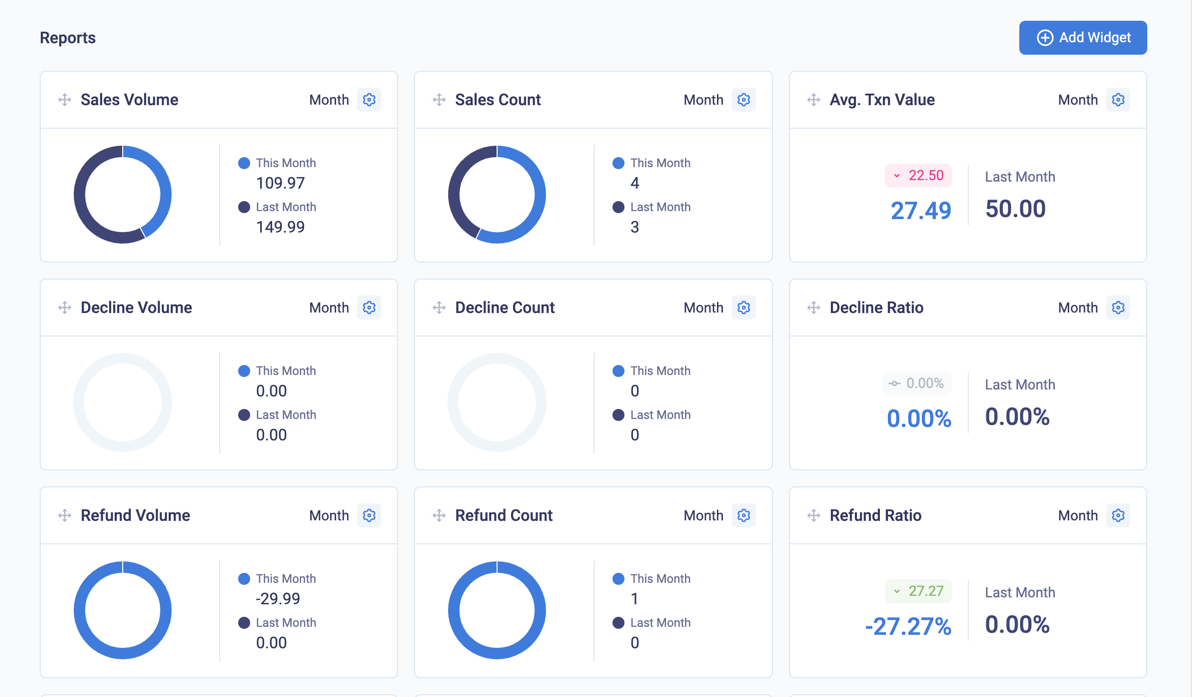
Sales, decline, and refund widgets on the dashboard
Dashboard data
- If your acquirer is not connected to CardCorp Hub, the dashboard does not show values for disputes, fraud, and settlement
- The dashboard does not include reversals of RDRs or CBs. It also does not include registration and preauthorisation or preauthorisation reversal transactions, which don't have a value.
Sales widgets
The widgets are Sales Volume, Sales Count, and Avg. Txn Value.

Sales widgets on the dashboard
| Widget | Description |
|---|---|
| Sales Volume | The amount of approved debit (DB) and capture (CP) transactions.By default, all transactions in all currencies for all channels, and for the current and previous month |
| Sales Count | The number of approved transactions |
| Avg. Txn Value | The Avg. Txn Value (Average Transaction Value) widget displays the value of Sales volume / Sales count |
Decline widgets
The decline widgets are Decline Volume, Decline Count, and Decline Ratio.

Decline widgets on the dashboard
| Widget | Description |
|---|---|
| Decline Volume | The amount of declined debit (DB) and capture (CP) transactions.By default, all transactions in all currencies for all channels, and for the current and previous month |
| Decline Count | The number of declined transactions |
| Decline Ratio | The value of Decline volume / Sales volume |
Refund widgets
The refund widgets are Refund Count, Refund Volume, and Refund Ratio.

Refund widgets on the dashboard
| Widget | Description |
|---|---|
| Refund Volume | The amount of refund (RF) transactions.By default, all transactions in all currencies for all channels, and for the current and previous month |
| Refund Count | The number of refund transactions |
| Refund Ratio | The value of Refund volume / Sales volume |
Dispute widgets
The dispute widgets are Dispute Volume, Dispute Count, and Dispute Ratio.

Dispute widgets on the dashboard
| Widget | Description |
|---|---|
| Dispute Volume | The amount of chargeback (CB) and chargeback2 (CB2) dispute transactions.By default, all transactions in all currencies for all channels for the current and previous month |
| Dispute Count | The number of chargeback (CB) and chargeback2 (CB2) transactions |
| Dispute Ratio | The value of Dispute volume / Sales volume |
Fraud widgets
The fraud widgets are Fraud Volume, Fraud Count, and Fraud Ratio.

Fraud widgets on the dashboard
| Widget | Description |
|---|---|
| Fraud Volume | The amount of debit (DB) and capture (CP) transactions flagged as fraud.By default, all transactions in all currencies for all channels for the current and previous month |
| Fraud Count | The number of transactions flagged as fraud |
| Fraud Ratio | The value of Fraud volume / Sales volume |
RDR widgets
The RDR widgets are RDR Volume, RDR Count, and RDR Ratio.

RDR widgets on the dashboard
| Widget | Description |
|---|---|
| RDR Volume | The amount of RDR (Rapid Dispute Resolution) refunds.By default, all transactions in all currencies for all channels for the current and previous month. |
| RDR Count | The number RDR refunds |
| RDR Ratio | The value of RDR volume / Sales volume |
Payment Activity
The Payment Activity widget contains a bar graph of the data in the payment advice report. To break down the payment activity, if you have more than one channel and merchant account identifier or billing profile, you can select from them.

The payment activity widget on the dashboard
| Field | Description |
|---|---|
| Released | The total of payment advice that was released to you this month. |
| Held | The total of payment advice that was held for you this month. Usually, this applies to weekly settlements, especially when payment advice will be settled next month. |
| Total | The total of payment advice for this month. |
Reserves Activity
The Reserves Activity widget contains a bar graph of the data in the rolling reserve report. If you have more than one channel and merchant account identifier or billing profile, you can select from them to break down the reserve activity.

The reserves activity widget on the dashboard
| Field | Description |
|---|---|
| Released | The amount of rolling reserve that has been released to you this month |
| Withheld | The amount of the rolling reserve that has been held for you from this month's payments |
| Current balance | The total reserves held for the merchant |
Updated over 1 year ago